Video Search Optimization: Unlock video search optimization for YouTube
Ever poured your heart and soul into creating a video, only to watch the view count stall in the double digits? It’s a frustratingly common story. So many UK creators get stuck here, mastering the craft of making a video but completely missing the science of getting it discovered.
This is where video search optimisation (VSO) comes in. Think of it as the crucial bridge connecting your brilliant content to the audience that's actively looking for it.
Why Your Videos Aren’t Being Found
It's a common belief that if you just create high-quality, beautifully shot content, the views will naturally follow. While great content is non-negotiable, it’s only half the story. If people can't find your videos through search, they might as well not exist.
The hard truth is that platforms like YouTube are search engines first and social networks second. People show up with a specific problem to solve, a question to answer, or a skill to learn. Your job isn't just to make an amazing video; it's to signal to the platform's algorithm that your video is the best possible answer to their query. Without those signals, even a masterpiece will struggle to reach beyond your existing subscribers.
The Growing Importance of Video Discovery
Let's face it, the online video world is crowded. To stand out, especially in a competitive market like the UK, you need more than just hope—you need a strategy.
Just look at where the money is going. In the UK, digital video advertising spend recently shot up to a massive £8.3 billion, a 20% jump in just one year. That now makes up 64% of all display advertising spend. This explosion in investment tells a simple story: visibility is currency. Your videos are valuable assets, but they only provide a return when they get found.
The biggest mistake I see is creators treating YouTube like a lottery, crossing their fingers for a viral hit. Real, sustainable growth comes from treating it like a library, where every single video is meticulously catalogued to be found by the right person at exactly the right moment.
Before we dive into the nuts and bolts, it's worth getting a solid grip on the fundamentals of what is video SEO and how it fits into your broader marketing efforts. This playbook goes beyond the usual generic advice to give you practical, actionable strategies for every step.
We're going to cover the whole process:
- Digging up searchable video ideas backed by real data.
- Structuring your videos to keep people watching longer.
- Writing titles, descriptions, and tags that actually work.
- Using your analytics to drive long-term, sustainable growth.
By the end of this guide, you'll have a repeatable system to turn VSO from a guessing game into your most reliable engine for growth.
Finding Video Ideas People Actually Search For
Great videos don't start with a flash of creative genius. They start with a question people are already asking. The single biggest shift you can make in your video strategy is to stop guessing what people want and start creating content you know they're looking for.
This means putting audience intent right at the heart of your process. Before you even think about hitting 'record', you need to dig into what your potential viewers in the UK are actually typing into YouTube and Google. It's the difference between shouting into the void and joining a conversation that's already happening.
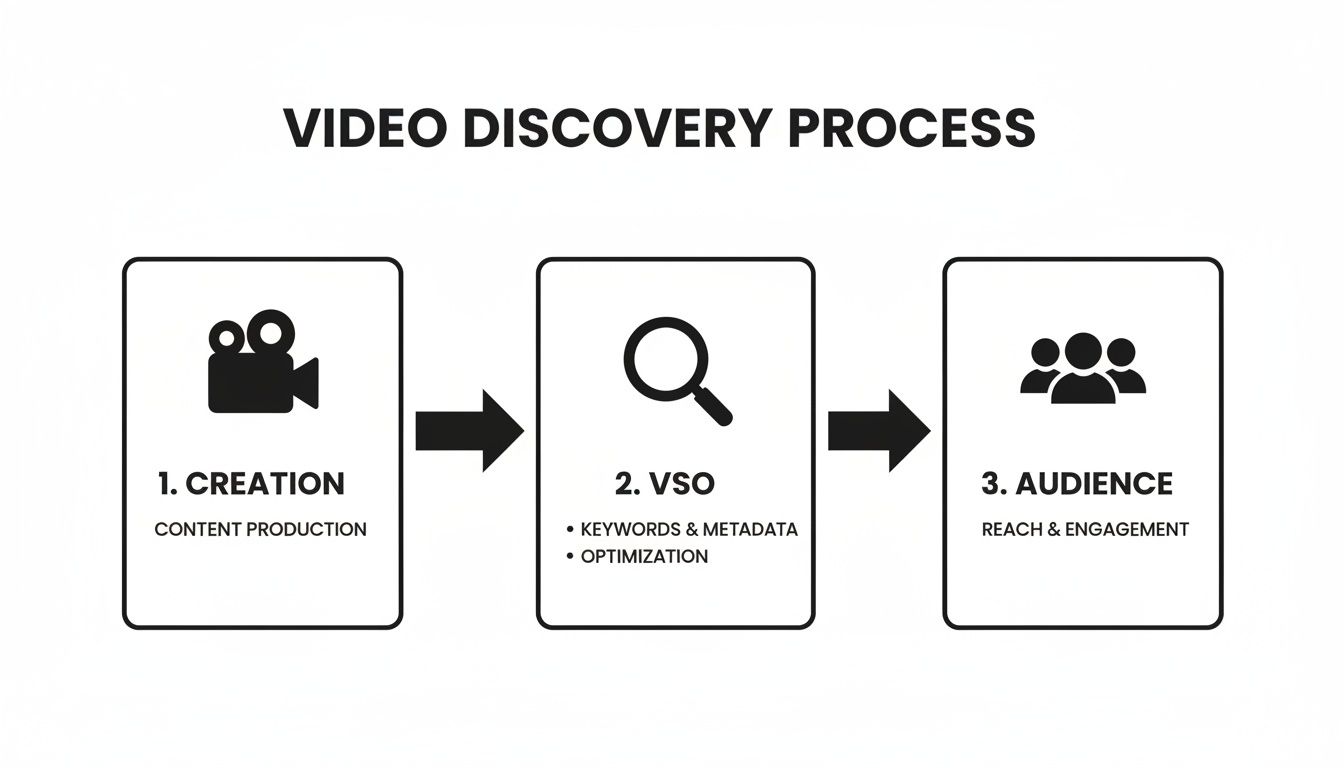
This whole workflow is about connecting your creativity to a real, waiting audience. Optimisation isn't something you bolt on at the end; it's baked in from the very beginning.
Tapping into Real Search Behaviour
Your secret weapon for understanding your audience is already at your fingertips. You can get surprisingly deep insights just by paying attention to simple, manual cues.
One of the best places to start is YouTube's own search bar. Seriously. Go to YouTube and start typing a broad topic related to your niche—say, "UK landscape photography". Watch what happens. The autocomplete suggestions that pop up aren't random; they are the most popular, related things people are searching for right now.
You'll likely see things like:
- "UK landscape photography for beginners"
- "Best camera settings for UK landscape photography"
- "Peak District landscape photography locations"
Each of these is a validated video topic with a built-in audience. Just like that, you’ve gone from a vague idea to a list of specific, in-demand video concepts.
Validating Your Ideas with Hard Data
Now that you have a list of promising ideas, it’s time to validate them. This is where you bring in the data to make sure there’s enough search volume to be worth your time, but not so much competition that you’ll be drowned out.
Think about it. If you're a UK-based tech creator, a video called "Cool Drone Footage" sounds fun, but it’s not what people search for. A quick bit of research, however, might show you that "best budget drone for UK landscape" gets a healthy number of searches every month. That’s a topic with proven demand.
Tools like Vidito can make this process incredibly quick. By pulling data directly from YouTube and Google Trends, it shows you search volume and competition levels for your ideas, giving you instant confirmation that you're on the right track. This data-first approach stops you from pouring hours into a video nobody will ever find.
The breakthrough moment for most creators is when they realise they need to be researchers as much as they are artists. Finding a topic with high search interest and low competition is like being handed a treasure map that leads directly to views.
The opportunity here in the UK is massive. While 43% of marketing professionals now use video, a staggering 39% aren't happy with their results, according to these UK digital marketing statistics from LocalIQ. That gap is almost always down to a disconnect between the content being made and what audiences are actually searching for.
Before you commit your time and resources, run your best ideas through this quick checklist. It's a simple way to gut-check if a topic has real potential or if it's a dead end.
Video Idea Validation Checklist
Use this checklist to evaluate if your video idea has strong search potential before you hit record.
| Validation Check | Why It Matters | Example Tool or Method |
|---|---|---|
| Search Volume | Is anyone actually looking for this? You need proof of an existing audience. | YouTube Autocomplete, Google Trends, Vidito |
| Competition Level | Can you realistically rank? Check if the top spots are held by huge, established channels. | Manual YouTube search, Vidito competition score |
| Audience Intent | What does the searcher want? Make sure your video idea solves their problem or answers their question. | Analyse top-ranking video titles and thumbnails. |
| Uniqueness Angle | Can you do it better or differently? Find a gap in the existing content you can fill. | Watch the top 3-5 videos and read the comments for unmet needs. |
If your idea ticks these boxes, you've got a much higher chance of creating something that not only gets made but gets found.
Beyond Keywords: Sizing Up the Competition
Finding a good keyword is just the first step. Next, you need to analyse the videos that are already ranking for that term. This isn’t about copying them; it’s about strategic reconnaissance to find a way to make something better, more helpful, or with a totally fresh perspective.
Go to YouTube, search for your target phrase, and watch the top three to five results. As you watch, ask yourself:
- What’s the format? Are they listicles, tutorials, reviews, or vlogs?
- How long are they? A pattern of long-form videos suggests viewers in this niche expect deep, detailed content.
- What are they missing? Is there a question they didn’t answer? A crucial detail they glossed over?
- What are people saying in the comments? The comment section is a goldmine. Look for questions people are asking that weren't answered in the video.
This quick analysis tells you what the standard of quality is and, more importantly, reveals the gaps you can exploit. For instance, if every video for "best budget drone for UK landscape" only shows footage from southern England, you could create one focusing entirely on stunning Scottish landscapes. You’ve immediately created something with unique value.
Learning to spot these opportunities is a massive part of the game. For a deeper dive into these strategies, our guide on how to find low-competition keywords offers even more advanced techniques.
Structuring Your Video for Watch Time and Engagement
Getting someone to click is only half the battle. The real challenge in video search optimisation is convincing them to stay. If viewers bail within the first few seconds, it sends a powerful negative signal to the algorithm that your content missed the mark, and your hard-earned ranking will vanish.
This is where you turn a fleeting click into a loyal viewer. It’s all about crafting an experience that holds their attention, delivers on the promise of your title, and actively encourages them to engage.
The Anatomy of a High-Retention Video
Strip away the fancy graphics and B-roll, and you’ll find that nearly every successful video follows a fundamental structure. It’s a psychological journey you guide the viewer on, and it has three critical parts: the hook, the promise, and the payoff.
The Hook (First 10-15 seconds): You get one shot at a first impression, and it’s brutally short. You have mere seconds to convince a viewer they’ve landed in the right place. A great hook could be a provocative question, a genuinely surprising statistic, or even a quick flash-forward to the final, impressive result.
The Promise (First 30 seconds): Right after you’ve hooked them, you need to state clearly what the video is about and what they’ll get out of it. This isn’t the time to be mysterious; it's about setting expectations and building trust. Think of it as a direct contract: "Stick with me, and this is exactly what you'll learn/see/achieve."
The Payoff (The Body and Conclusion): This is where you make good on your promise. The content needs to be well-paced, engaging, and deliver value from start to finish. It all culminates in a satisfying conclusion that wraps everything up neatly.
Scripting Techniques to Keep Viewers Glued
A solid structure is nothing without a script that keeps people actively watching. Passive viewing is the enemy—it leads directly to drop-offs. Your job is to keep their brain switched on.
One of the most powerful tools in your arsenal is the "open loop." It’s a classic storytelling trick where you introduce an idea or a question early on but deliberately delay the answer. This creates a natural curiosity and a bit of tension that makes people need to know what happens next.
- Practical Example: In a tech review, you could say, "This laptop has one major flaw that could be a dealbreaker for most people... but first, let's talk about this incredible screen." You've just opened a loop. Viewers will stick around to find out what that flaw is.
Pacing is also crucial. Monotony kills engagement. You have to break up long, static shots.
- Sprinkle in B-roll footage to visually demonstrate what you're talking about.
- Use on-screen text and graphics to hammer home key points.
- Employ quick cuts and zooms to add energy and direct the viewer's focus.
- Layer in music and sound effects to build a mood and keep the momentum going.
Think of viewer attention as a currency. Every single second of your video must be an investment that provides a return. If a segment doesn't educate, entertain, or move the story forward, it's costing you attention. Cut it.
Case Study: Sorted Food
Let’s see this in action with the brilliant UK-based YouTube channel, Sorted Food. Their videos are an absolute masterclass in structure and pacing, which is a massive reason why they’ve built such a huge and dedicated audience.
Take a close look at how they put together their recipe videos:
- The Hook: They almost always kick off with a stunning, mouth-watering shot of the finished dish. It’s an instant visual gut-punch that grabs the attention of anyone searching for that recipe.
- The Promise: Within seconds, one of the presenters clearly states what they’re making, often highlighting a unique twist or a simple technique. They might flash the core ingredients on screen, reinforcing the promise and managing expectations.
- The Payoff: The actual cooking process is broken down into clear, high-energy steps. They use a flurry of quick cuts, multiple camera angles, and playful on-screen text. The banter between the hosts creates its own narrative, opening and closing small loops and keeping the energy high, ensuring you stay locked in until the very last bite.
Their structure is a repeatable formula that just works. It respects the viewer’s time, delivers consistent value with clear instructions, and uses personality and sharp editing to make it all incredibly watchable. It’s a perfect model for structuring your own content.
Making Your Video Metadata Work for You
Think of your video's content as the product itself. The metadata—your title, description, and tags—is the packaging. It’s the signpost that tells both search engines and potential viewers what’s inside.
When you get this right, you put your video directly in the path of the people searching for it. If you get it wrong, even the most brilliant video will sit on a digital shelf, completely invisible. This isn't just about stuffing keywords in; it's about strategically crafting every element to work together to earn that click.

Crafting Titles That Demand to Be Clicked
Your video title is, without a doubt, the most important piece of metadata you'll write. It's your headline and your promise, all rolled into one. A great title has to walk a fine line, satisfying the search algorithm while also sparking real human curiosity.
I always tell people to imagine they have two customers. The first is the algorithm, which needs a clear, keyword-driven signal to understand your video's topic. The second is the person scrolling, who needs an emotional or practical reason to choose your video over the ten others on the page.
Here’s a practical example of this transformation:
- Before (Vague & Unoptimised): My New Camera Test
- After (Optimised & Compelling): Sony A7IV Real-World Test: Is It Still the BEST Hybrid Camera for UK Creators in 2024?
The second version just works better. It nails the primary keyword ("Sony A7IV Real-World Test"), poses a genuinely interesting question, calls out a specific audience ("UK Creators"), and adds a sense of urgency with the year. It gives both the search engine and the user everything they need to know.
Writing Descriptions That Rank and Convert
Your video description is your secret weapon for video search optimisation. So many creators just dash off a sentence or two and call it a day, but this is prime real estate. It's your chance to provide deep context, sprinkle in secondary keywords, and guide your viewer's journey.
A properly optimised description should be structured with intention.
- The Hook (First 2-3 Lines): Start by rephrasing your title in a conversational way. These first few lines are what show up under your video in search results, so make them compelling. For example:
In this Sony A7IV real-world test, we push the camera to its limits to see if it's really the best choice for UK creators in 2024. Find out our honest thoughts... - The Detail (Main Body): Give a solid summary of the video. What problems are you solving? What questions will be answered? This is where you can naturally weave in those secondary keywords you found.
- Timestamps (Navigation): Break your video into chapters with clickable timestamps. This is fantastic for the viewer's experience and can even get you "Key Moments" in Google search results, which is a huge visibility boost.
- Links & Resources: Always include links to other relevant videos, your social channels, or any products you talked about.
A great trick I've learned is to use a YouTube video to text converter to generate a full transcript. You can then edit this down and pop it into your description, instantly populating it with every relevant keyword you actually said in the video. It's a massive time-saver.
Mastering the Art of Video Tags
Tags are another signal you send to platforms like YouTube to help them figure out what your video is about and who might want to see it. While they might not have the same direct ranking power they once did, they are still vital for getting your video recommended alongside similar content in the "suggested videos" sidebar.
A smart tagging strategy is all about variety. For our Sony A7IV video example, this would look like:
- Specific Tags: "Sony A7IV review," "Sony A7IV real world test," "Sony A7IV 2024."
- Broad Tags: "mirrorless camera," "videography camera," "best hybrid camera."
- Branded Tags: Always tag your channel name (e.g., "TechCreatorUK") to help the algorithm connect all of your content together.
For anyone creating content in the UK, understanding how video and search work together is critical. We're seeing 41% more web traffic going to sites that feature video, driven directly from search. With things like AI overviews now in the mix, 51% of UK marketers are already seeing more clicks from search, making video optimisation a top priority.
A classic mistake is loading up on broad, high-volume tags, hoping to catch a wider net. The reality is that a few hyper-specific, relevant tags will almost always do better than a dozen generic ones. They connect your content with a more qualified audience that is actively looking for what you've made.
If you’re feeling stuck on which tags to use, a specialised tool can be a game-changer. To get a head start, check out our guide on how a YouTube tag extractor can help you analyse what's already working for the top-ranking videos in your niche.
Creating Thumbnails That Get Noticed
Your thumbnail is your video's billboard on a very busy street. In a sea of search results, it's often the single factor that decides whether someone clicks on your video or just keeps scrolling. It has to be clear, emotionally engaging, and visually different from everything else around it.
Just look at what MrBeast does; he's a master of the thumbnail. His designs are a perfect case study in getting this right.
- High Contrast & Bright Colours: His thumbnails use vibrant, saturated colours that immediately jump off the page and grab your attention.
- A Clear Focal Point: There’s always one central thing to look at—usually a person's expressive face or a really intriguing object—that tells you the video's core idea instantly.
- Minimal Text: When he does use text, it's huge, bold, and limited to a few powerful words that add to the visual story.
You don't need to be a professional graphic designer, but you do need to follow these core principles. Use a clean, easy-to-read font, start with a high-quality image, and make sure your thumbnail communicates your video's value at a single glance. When a killer thumbnail and a perfectly optimised title work together, you create a combination that’s almost impossible not to click.
Using Advanced Tactics to Build Channel Authority
Once you've got the basics of optimising individual videos down, it's time to think bigger. This is where you shift from just getting views to building a genuine authority channel. When YouTube’s algorithm starts to see your channel as the go-to resource for a specific topic, it begins to reward you by recommending your content far more widely. The key is to create a connected web of content that reinforces your expertise at every turn.
These advanced tactics aren't about one-off wins. They’re about building a powerful, long-term asset. It’s the difference between having a random collection of videos and curating a definitive library on your subject.
The Power of Playlists and Topic Clusters
Think of a single optimised video as a detailed chapter. A playlist is the entire book. When you group related videos into a logical series, you're doing more than just keeping your channel tidy; you're creating a binge-watching machine. As soon as a viewer finishes one video, the next one in the series automatically plays, which can dramatically increase their session watch time. This is one of the most powerful signals you can send to YouTube.
This naturally leads to the idea of topic clustering. Instead of making videos on random subjects, you build a network of content around a central "pillar" topic. For instance, a channel focused on personal finance might create a pillar video on "How to Create a Budget." They would then support it with cluster videos like "Best Budgeting Apps for 2024," "Saving Money on Groceries," and "How to Pay Off Debt Faster."
This strategy positions your channel as the ultimate resource for that subject, making it far more likely that YouTube will recommend your other videos to anyone who watches one.
Case Study: Ali Abdaal’s Productivity Ecosystem
A brilliant example of topic clustering in action is the creator Ali Abdaal. He has built an entire empire around the central theme of productivity. He doesn't just have one video on the topic; he has a deeply interconnected ecosystem.
- Playlists as Courses: His playlists are cleverly structured like mini-courses, with names like "The Ultimate Guide to Productivity" or "How to Study for Exams." This structure instinctively encourages viewers to watch multiple videos in a single sitting.
- Interlinking Content: He constantly references his other videos within his content, guiding viewers deeper into his content web and keeping them on his channel longer.
- Reinforcing Authority: By creating such a comprehensive library on one core topic, he has cemented his channel as the definitive authority, making it the default destination for anyone searching for productivity tips.
This approach creates a virtuous cycle. The more videos someone watches, the more the algorithm sees your channel as authoritative, which leads it to recommend your content to an even wider audience.
Don't Underestimate Captions and Transcripts
Uploading your own accurate captions, usually as an SRT file, is one of the most underrated video search optimisation tactics out there. Sure, YouTube's auto-captions are getting better, but they're still far from perfect. Providing a flawless transcript of your own does two critical things.
First, it makes your content accessible to a much wider audience, including viewers who are deaf, hard of hearing, or simply watching with the sound off.
Second, and this is crucial for SEO, it gives search engines a complete, word-for-word text version of your video. This provides a rich source of keywords and context that helps both YouTube and Google understand exactly what your video is about, improving its chances of ranking for very specific, long-tail search queries.
Think of your SRT file as a detailed article that accompanies your video. You wouldn’t publish an article full of typos, so don’t settle for inaccurate auto-captions that could misrepresent your content to search algorithms.
Extending Your Reach with Schema Markup
Your video’s journey doesn’t have to end on YouTube. Embedding your videos on your own website or blog opens up a powerful new discovery channel through Google Search. To get the most out of this, though, you need to use Schema markup.
Schema is basically a type of code you add to your website that explicitly tells search engines what your content is. By using VideoObject schema, you can spoon-feed Google details like the title, description, thumbnail URL, and upload date. This makes your content eligible for rich snippets in Google search results—those eye-catching video thumbnails that appear directly on the results page.
These rich snippets can seriously boost your click-through rate from Google, driving highly relevant traffic to your content. For an even deeper look into how to measure your success, you can learn more about how to use analytics on YouTube to track your progress and see the impact of these efforts.
Answering Your Top VSO Questions
It’s completely normal to have questions when you start digging into video search optimisation. You're putting new strategies into practice, and it’s natural to wonder what to expect. Let's tackle some of the most common questions I hear from creators to help you build a confident, effective VSO workflow.
How Long Does Video Search Optimisation Take to Work?
This is the million-dollar question, isn't it? The most honest answer I can give is: it depends. VSO isn't like flicking a switch with paid ads; it's a long game. You're building an asset that grows in value over time.
For a brand-new video aimed at a keyword with medium competition, you might see a trickle of search traffic in a few weeks. But to see it rank consistently and pull in serious views? You’re likely looking at three to six months. It all hinges on things like your channel's authority, how competitive the keyword is, and crucial performance metrics like watch time.
Think of it as planting a tree. You do the hard work upfront, but the real growth happens slowly and steadily as the algorithm gathers data and starts to trust your video's value.
Do I Need to Go Back and Optimise Old Videos?
Yes, absolutely. Your back catalogue is a goldmine waiting to be discovered. If you have older videos with solid production value but were published with weak titles and descriptions, a VSO refresh can bring them back from the dead.
Here’s a practical, real-world scenario: Imagine a travel creator has an old video called "My Trip to Cornwall." It’s doing nothing. By applying what we’ve talked about, they can give it a new lease of life.
- Keyword Research: They discover that "best things to do in St Ives Cornwall" gets a lot of searches.
- Title Update: The old title gets scrapped. The new one is "10 UNMISSABLE Things To Do in St Ives, Cornwall (2024 Travel Guide)."
- Description & Tags: They write a detailed description, add timestamps for each of the 10 points, and include tags like "Cornwall travel," "St Ives guide," and "UK staycation ideas."
- New Thumbnail: They design a bright, eye-catching thumbnail of a stunning location with bold text like "DON'T MISS THIS!"
This kind of "re-launch" can get the video ranking for completely new search terms, bringing in a steady flow of views years after it was first uploaded.
YouTube Tags or Hashtags—Which Is More Important?
This is a common point of confusion. While they seem similar, they do different jobs. YouTube tags are far more important for long-term search discovery, whereas hashtags are more about short-term content grouping.
- Tags: Think of these as backend metadata. You add them when you upload, and they're a powerful signal that helps the YouTube algorithm understand your video's context and what other content it relates to. Good tag strategy involves a mix of broad and very specific terms.
- Hashtags: These go directly in your title or description (like #VideoSEO). They link your video to a specific hashtag page, grouping it with other videos on the same topic. They’re useful for tapping into trending conversations but have a minimal impact on your video's evergreen search performance.
My advice? Put 80% of your effort into crafting a strong set of backend tags for search. Then, sprinkle in a few relevant hashtags for a bit of topical discovery. Your tags are what will do the heavy lifting for your VSO strategy.
In short, a mix is fine, but if your time is limited, well-researched tags will deliver much more value in the long run.
Ready to stop guessing and start creating videos you know people are searching for? Vidito is your AI-powered co-pilot for YouTube success. Generate dozens of data-backed video ideas in seconds, validate search demand, and write click-worthy titles that get you noticed. Start making smarter content today by visiting https://vidito.ai.