How to Get Verified on YouTube: Step-by-Step Guide
That little grey tick next to a YouTube channel name is more than just a shiny badge; it’s a stamp of authenticity. Getting verified on YouTube is the platform's way of confirming that you are who you say you are. It tells your audience they've found the real creator, brand, or artist, which is a powerful way to build trust right from the get-go.
But let's be clear: this badge is about legitimacy, not a secret key to unlocking algorithmic success.
What the YouTube Verification Badge Actually Means

Many creators see that grey tick as a mark of having "made it," but its real job is much more practical. At its heart, YouTube verification is all about authenticity. It’s the platform’s official nod, confirming that a channel genuinely belongs to the person or company it claims to represent.
This is incredibly important in a world where impersonation is a genuine problem. For your viewers, that little badge is a shortcut. It instantly tells them they're watching content from the official source, not a fan-run account or a flat-out copycat. It cuts through the noise and builds a direct line of trust between you and your audience.
More Than Just a Status Symbol
While it definitely adds a professional sheen to your channel, the real value of verification is in brand protection and audience confidence. It doesn't magically unlock new features, give you access to secret creator tools, or tell the YouTube algorithm to push your videos harder. Your channel's growth still comes down to the quality of your content and how well it connects with people.
Think about a massive UK-based tech creator like Arun Maini, better known as Mrwhosetheboss. His brand is a huge target for impersonators. That verification badge is crucial because it immediately lets millions of viewers know they’re on his official channel, protecting his hard-earned reputation.
It’s just as important for a niche creator. Take the UK's History with Hilbert, for instance. The badge cements his authority in a very specialised field. It assures his community they're engaging with the real historian, preventing any mix-ups with other channels covering similar ground.
Key Takeaway: The YouTube verification badge is a tool for authentication, not amplification. Its main job is to prove you're the real deal, which is the cornerstone of building a secure and loyal community.
Clearing Up Common Verification Myths
It’s so important to separate fact from fiction here. A lot of creators fall into the trap of thinking verification comes with all sorts of hidden perks, but that’s just not how it works.
Let’s bust a few of the most common myths:
- Myth: Verification boosts your channel in search results.
- Reality: The badge has zero impact on the YouTube algorithm. Your search ranking depends on things like watch time, engagement, and how well you’ve optimised your video titles and descriptions—not your verification status.
- Myth: Verified channels get priority support from YouTube.
- Reality: Access to Creator Support comes from being in the YouTube Partner Programme. The verification badge itself doesn't put you in a faster queue for help.
- Myth: It unlocks exclusive features.
- Reality: Features like the Community tab or Stories are unlocked based on subscriber counts and channel activity, not whether you have a tick next to your name.
At the end of the day, chasing verification is a strategic move to safeguard your brand and strengthen the connection with your audience. It’s all about establishing your legitimacy in a very crowded space.
Getting Past the Gatekeepers: The Four Pillars of YouTube Verification
Before you even think about hitting that ‘apply’ button, you need to be absolutely certain your channel is built on solid ground. YouTube's verification process isn't just about subscriber numbers anymore; they now look at four key pillars to determine if your channel is the real deal.
Think of it this way: if any one of these pillars is wobbly, your whole application will come crashing down. YouTube needs to see undeniable proof of who you are and why you matter before they’ll grant you that coveted grey tick. Let's break down exactly what their review team is looking for.
Pillar 1: Authenticity
This one’s the most straightforward. Your channel has to represent a real person, a legitimate brand, or an actual organisation. Plain and simple, you need to be who you say you are.
This rule is all about stamping out impersonation. If your channel is for your personal brand, it must be crystal clear that you're the one behind it. If it’s for a company, say a new London-based coffee roaster, there can’t be any ambiguity about its identity.
A Word of Warning: YouTube has a zero-tolerance policy for impersonation. Any channel trying to pass itself off as another creator or brand will be rejected outright. Make sure your identity is uniquely and honestly your own.
Pillar 2: Completeness
A complete channel signals to YouTube—and your audience—that you're serious. A profile that looks half-finished or abandoned is an immediate red flag for the review team. It just doesn't look credible.
So, what does a ‘complete’ channel look like? It has to be active and have a few essential elements dialled in.
- A unique channel banner: This is your digital billboard. It should be high-quality and instantly communicate what your channel is all about.
- A detailed description: Your "About" section is prime real estate. Use it to clearly explain your channel's purpose, who you are, and what viewers can expect.
- A clear profile picture: This needs to be a sharp, high-resolution image—a professional headshot for a creator or a crisp logo for a business.
- Public videos: This should go without saying, but you must actually have content on your channel. An empty channel will never get verified.
These aren't just cosmetic touches; they’re vital signs of a healthy, trustworthy channel.
Pillar 3: Notability
This is where most creators get stuck. To be verified, your channel needs to represent a "well-known or highly searched for" creator, brand, or entity. But what on earth does "well-known" actually mean in YouTube's eyes?
Essentially, the review team wants to see that you have a recognisable presence outside of YouTube. They're looking for proof that you're making waves in the wider world, not just within the platform's ecosystem.
Here’s the kind of evidence they look for:
- Press mentions: Features in online articles, newspapers, or respected industry blogs.
- Strong social media presence: Active and established profiles on other platforms like Instagram, X (formerly Twitter), or LinkedIn.
- An official website: A professional home for your brand or personal portfolio.
- A Wikipedia page: While not essential, having one is a massive signal of notability.
Building this off-platform presence is a marathon, not a sprint. Interestingly, as you focus on becoming more prominent, you’ll also naturally discover better strategies for how to get subscribers on YouTube, since both goals often involve the same kind of outreach and brand-building.
Mini-Case Study: The Rise of a UK Tech Channel
Let’s imagine a channel called "Tech Simplified UK." For the first year, the creator focused entirely on making two videos a week. He did well, hitting 50,000 subscribers, but when he first applied for verification, he was denied. The reason? A lack of notability.
Instead of giving up, he got strategic. He started engaging with tech journalists on X, offering expert quotes for their articles. This led to mentions in three different tech blogs. He also launched a simple but professional website to showcase his work and even appeared as a guest on two smaller tech podcasts.
Three months later, he reapplied. His subscriber count hadn't changed much, but his off-platform presence was transformed. He was approved because he had successfully demonstrated that "Tech Simplified UK" was a recognised name in its niche—not just another channel lost in the YouTube sea.
Pillar 4: Compliance
Last but not least, your channel has to play by the rules. This means you must be in good standing with YouTube, following its Community Guidelines and Terms of Service to the letter.
If your channel has active Community Guideline strikes or a history of violations, your chances of getting verified are practically zero. YouTube simply won't stamp its approval on a channel that consistently disregards its policies. This pillar is completely non-negotiable.
How to Apply for That YouTube Verification Badge
So, you’ve done the hard work, you've hit the 100,000 subscriber mark, and your channel is ticking all the right boxes for eligibility. Now for the exciting bit: applying for that little grey tick. This isn't just about filling out a form; it's about making a solid case for your channel. Think of it as your pitch to YouTube's review team. A little strategy here can make all the difference between a quick approval and a frustrating rejection.
First things first, you won’t find a big "Apply Here" button in your YouTube Studio dashboard. The only legitimate way to apply is through the official application page in the YouTube Help Centre. Be very wary of any third-party sites or services claiming they can get you verified for a fee – they can't.
Kicking Off Your Application
To get started, make sure you're logged into the Google Account for the channel you want to verify. The form itself is pretty simple, asking for your channel name and ID. But the most important part is the justification box. This is where you sell yourself.
Simply saying "I want to look official" is a fast track to getting your application denied. YouTube needs to see a genuine reason, primarily that you're prominent enough to be at risk of impersonation.
Think of your justification as a short, sharp pitch. You need to convince YouTube that your channel's notability makes verification a necessity, not just a nice-to-have. It’s about protecting your brand and your viewers from copycats.
If you're looking to get everything just right before you apply, you can find lots of useful resources for YouTube creators online that offer checklists and extra guidance.
The entire review process is built around ensuring only genuinely authentic and noteworthy creators get the badge. This keeps the tick meaningful. YouTube's team will be looking at four key things during their review.
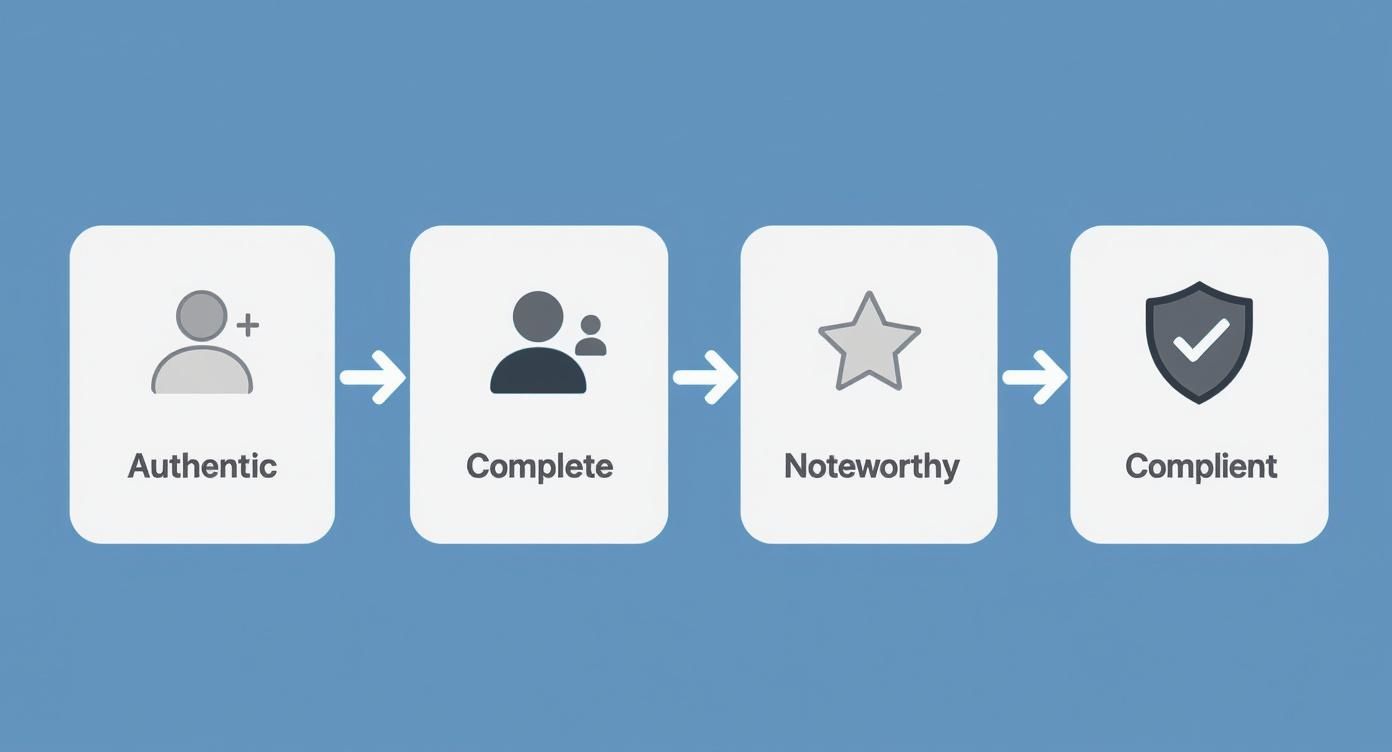
Remember, these aren't just suggestions. Your channel has to pass every single one of these checkpoints: Authenticity, Completeness, Notability, and Compliance.
How to Write a Justification That Works
This is your moment to make a strong impression. Don't be shy. You need to lay out exactly why your channel deserves that official stamp of approval.
Here’s what you should aim to include:
- Prove You're a Big Deal: Briefly mention your presence outside of YouTube. Something like, "My channel, [Your Channel Name], supports my work as a published author and public speaker, with recent features in [Major Publication A] and [Well-known Blog B]."
- Show the Impersonation Risk: This is a huge factor for YouTube. You could frame it like this: "As my channel's profile in the [Your Niche] space grows, we've seen several unofficial accounts pop up, which is causing confusion for my audience."
- Explain Why You're the 'Official' Source: What makes your channel the one and only? For instance, "As the official channel for the [Brand Name] app, verification is vital to ensure our users get accurate support directly from us, not from imitators."
Let's put this into practice. Imagine a UK-based gaming channel, "Pixel Perfect," run by a streamer who just competed in a major esports tournament.
A weak justification sounds like this:
"I want to be verified because I have lots of subs and my videos get good views."
A strong justification looks like this:
"My channel, 'Pixel Perfect,' is my official presence as a professional esports competitor. After placing in the top three at the recent UK Gaming Masters, my work was covered by IGN and PC Gamer. Several fan channels are now using my branding, creating confusion. Verification is crucial to confirm my identity and protect my community from misinformation."
Hitting 'Submit' and Playing the Waiting Game
Once you've polished your justification and submitted the form, the final step is to wait. It can take anywhere from a few days to a couple of weeks to hear back from YouTube via email.
My advice? Be patient. Don't be tempted to resubmit your application over and over again, as it won't speed things up. Just keep doing what you do best: making great content and engaging with your community. That consistent activity is exactly what the review team wants to see.
If you get the green light, the badge will appear on your channel automatically. If it's a no, they'll usually give you a brief reason why, so you'll know what to work on before you try again.
How UK Online Safety Laws Impact YouTube Verification
If you're creating content in the UK, you’ve probably noticed things are changing. Getting that coveted verification badge—or even just managing your channel day-to-day—now has an extra layer of complexity thanks to new laws.
This isn't just another internal YouTube policy tweak. It’s a direct result of government regulations designed to make the internet safer, especially for younger users. Getting your head around this is crucial, as it explains why you might be asked for ID and what it means for your channel's future.
The Online Safety Act and Its Impact
The real game-changer here is the UK's Online Safety Act. This piece of legislation has completely shifted the landscape, forcing platforms like YouTube to be much more proactive about who is using their service.
Under the new codes from Ofcom (the UK's communications regulator), any service "likely to be accessed by children" has to put strong age verification systems in place. The goal is to stop minors from seeing harmful or age-inappropriate content. You can find a deeper dive into these rules in Redact.dev's analysis on YouTube ID verification in the UK.
What does this mean in practice? YouTube is now legally required to be more stringent about confirming the age of its UK users. You might be prompted to prove you're an adult by uploading a government-issued ID or providing valid credit card details. This has nothing to do with your subscriber count and everything to do with legal compliance.
Ofcom's central role in enforcing these online safety rules is highlighted on their official site.
This screenshot really drives home Ofcom's authority to regulate these platforms, which is the direct cause of the tougher identity checks creators are now facing.
Why This Matters for Your Channel
So, how does this legal shift actually affect you? It brings in a whole new type of "verification" that’s completely separate from the public badge. You could be asked to verify your identity just to use certain features or even to keep your monetisation active.
This is where it can get a bit confusing. It’s essential to distinguish between the two:
- The Public Verification Badge: This is about proving your channel is the official and notable presence for a creator, brand, or artist, especially if there's a risk of impersonation.
- The new Age/Identity Verification: This is a behind-the-scenes check to confirm you're an adult, which is now a legal requirement under UK law.
Failing to complete a mandatory age check could lead to restrictions on your account. It's a critical step that shows you're a responsible creator operating within the UK's new legal framework. While it doesn't change how many views you need to make money on YouTube, ignoring these compliance requests could definitely put your monetisation at risk.
Key Insight: Think of it like this: the verification badge is a public symbol of authenticity, while the ID check is a private, legal necessity. For UK creators, both are becoming increasingly important.
A UK Creator Navigates the New Rules
Let's look at a real-world scenario. Imagine "London Life with Liam," a UK-based vlogger who has been monetised for years but doesn't have the official grey tick. One morning, he gets a notification from YouTube asking him to verify his age by submitting a photo of his driving licence.
At first, he's confused, thinking it's related to the public verification badge. But he quickly realises it's a mandatory check tied to the Online Safety Act.
Liam completes the process, and his channel carries on without a hitch. By acting quickly, he ensured his account remained in good standing not just with YouTube's policies, but with UK law. This new reality makes staying on top of the rules more vital than ever for running a successful channel.
So, YouTube Said No. Now What?
Getting that rejection email is a gut punch. I've seen it happen to creators big and small, and it always stings. It’s easy to feel like you've hit a wall, but honestly, it’s rarely the end of the story.
Think of it less as a "no" and more of a "not yet". That rejection is usually pointing to one or two areas of your channel that need a little more love before you’re ready for the grey tick. The best part? These issues are almost always fixable. Once you understand why YouTube didn't approve you, you can turn that feedback into a clear action plan and try again in 30 days.
The “Not Famous Enough” Hurdle
This is, without a doubt, the most common reason for rejection. You might have a fantastic, engaged community and incredible videos, but if the YouTube review team can't find you outside of YouTube, they'll likely pass. They're looking for signs that you're a recognised voice in your niche, not just one creator in a sea of millions.
To fix this, you need to deliberately build your credibility beyond your channel.
- Get Your Name Out There: Start reaching out to bloggers, podcasters, and journalists in your field. You don’t need to be on the BBC; even a feature on a respected industry blog is a huge signal to the review team.
- Beef Up Your Socials: Get active on platforms like X (formerly Twitter), Instagram, or LinkedIn. It’s not just about posting your videos; it’s about joining the conversation and establishing yourself as an expert.
- Team Up: Collaborating with established, verified creators is a brilliant way to borrow some of their credibility and get in front of a new audience.
Building a brand is a marathon, not a sprint. If you're looking for more ideas on this front, our guide on how to grow your YouTube channel is packed with strategies that directly support this.
Your Channel’s First Impression
Let’s be honest: first impressions count. If your channel looks thrown together or incomplete, it signals to the review team that you might not be taking this seriously. It’s a simple thing to fix, but so many creators overlook it.
I remember working with a UK-based gaming creator—we’ll call him "RetroPlayer"—who was rejected despite having over 150,000 subscribers. The reason was obvious when you looked: his channel banner was a blurry, generic image, and his "About" section was completely empty.
How He Fixed It: RetroPlayer got a professionally designed banner and logo that truly represented his retro gaming brand. He then sat down and wrote a compelling, keyword-rich "About" section explaining his channel's mission. He reapplied 30 days later and sailed through the approval process.
This just goes to show that professional branding isn’t just for looks. It’s a powerful signal of your commitment and authenticity to YouTube's review team.
Missing the Point of Verification
It's easy to fall into the trap of thinking verification is a prize for hitting a subscriber milestone. It's not. The badge exists for one primary reason: to prevent impersonation. If there’s no real risk of someone pretending to be you, YouTube might not see the need to verify your channel.
This has become especially important in the UK, where platform accountability is a massive topic. Think about the public reaction to YouTube's stricter age verification rules, where a petition against the Online Safety Act gathered around 550,000 signatures. You can see more on this in this deep dive into the public response. Identity and safety are taken very seriously, so your application needs to clearly show why that badge is necessary to protect your audience from fakes and confusion.
Your YouTube Verification Questions Answered
Even with a solid plan, trying to get that little grey tick next to your channel name can feel a bit mysterious. Let's clear up some of the most common questions and myths that pop up.
Do I Still Need 100,000 Subscribers?
This is the big one, and thankfully, the answer is no. That 100k subscriber milestone used to be a hard and fast rule, but YouTube’s approach has changed.
These days, it’s much more about proving your channel is authentic, complete, and—this is the key—notable. A smaller channel that’s been featured in the media or has a strong, verifiable presence elsewhere online often has a better shot at verification than a massive channel that exists only on YouTube. Think of it as proving you're a real, public figure or brand.
How Long Does the Verification Process Take?
Once you’ve sent your application off, it's a bit of a waiting game. You can typically expect a response from YouTube's review team anywhere from a few days to a couple of weeks. Of course, this can stretch out depending on how many applications they're dealing with at the time.
My advice? Don't stress. If you haven't heard anything after a month, it's fair to check in on the status, but definitely don't keep resubmitting your application. The best use of your time is to keep making great videos and connecting with your audience.
Can I Lose My Verification Badge?
Absolutely. That verification badge isn't for life. You can lose it for a few main reasons:
- Breaking the Rules: If your channel gets a strike for violating YouTube's Community Guidelines or Terms of Service, the badge is often the first thing to go.
- Changing Your Channel Name: Decided on a rebrand? If you change your channel name, the badge disappears. You'll have to apply all over again under the new name.
- Going Inactive: If you stop uploading for a long time and your channel essentially becomes dormant, YouTube might decide to remove the badge.
It's also worth noting that many verified creators focus heavily on making their content accessible to a wider audience. They often use professional YouTube transcription services to add accurate captions, which not only helps with SEO but improves the viewer experience—all things that contribute to a healthy, authoritative channel.
What If My Application Is Rejected?
It’s definitely a bummer, but a rejection isn't the end of the road. If YouTube says no, you can re-apply after 30 days.
Don't just hit submit again after a month, though. Use that time wisely. Look at your channel with a critical eye and figure out where you might be falling short. Is it a lack of notability? Is your branding inconsistent? Fix those things first, and your next application will be much stronger.
The whole point of verification is to build trust, and it's clear audiences are craving that. Just look at the growth of YouTube Premium—global subscriber numbers are projected to hit 125 million in 2025, which is a 25 percent increase from 2024. People are willing to pay for content from creators they trust, and the verification badge is a big part of that equation. You can dig into more of these YouTube user statistics and their implications to see the trend.
Ready to stop guessing and start creating viral video ideas? Vidito uses AI and real-time data to generate concepts your audience will love. Discover your next hit video today at https://vidito.ai.